TikTok safe zone checker for lyric videos (plus Reels and Shorts)
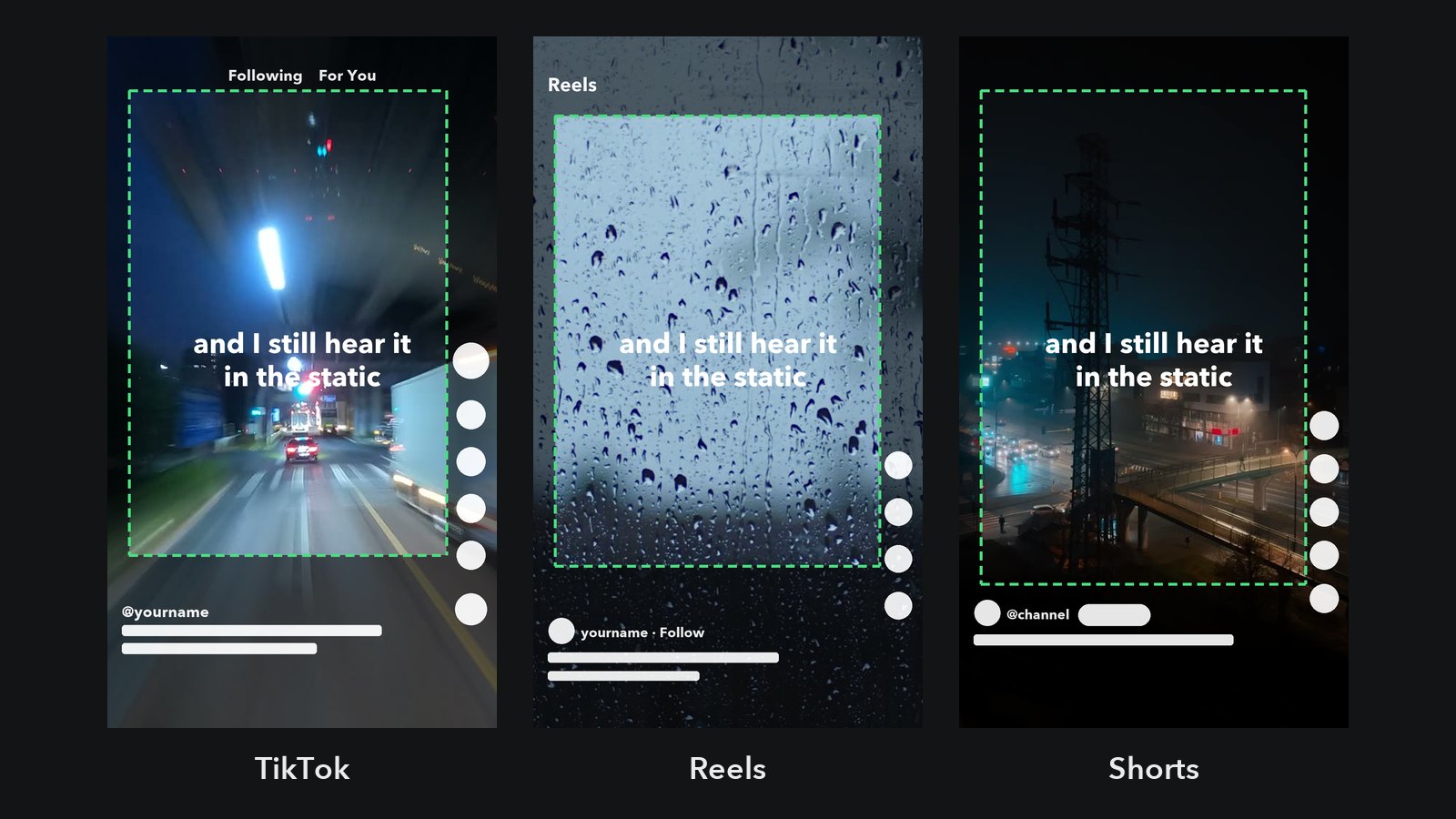
TikTok, Reels and Shorts draw their own buttons, your username and the caption right on top of your video. Anything you put under them, a lyric line, a hook, a face, is gone for the viewer. Check your frame below: upload it, type your lyric line and drag it around until it sits clear on every app you post to.
Your file stays on your device. Nothing is uploaded.
Safe zone sizes for TikTok, Reels and Shorts
All three apps play vertical video at 9:16, so make the video 1080 × 1920. These are the margins to keep clear on that frame, in pixels. None of the apps publishes official numbers for normal posts, and the interface shifts a little between phones and app versions, so the margins here are on the generous side of what the published guides measure. If your text clears them, it clears the app.
| App | Top | Bottom | Left | Right | Safe area |
|---|---|---|---|---|---|
| TikTok | 150 | 480 | 60 | 140 | 880 × 1290 |
| Instagram Reels | 220 | 450 | 60 | 120 | 900 × 1250 |
| YouTube Shorts | 150 | 400 | 60 | 120 | 900 × 1370 |
| All three | 220 | 480 | 60 | 140 | 880 × 1220 |
The bottom is the big one. Your username, the caption and the sound name stack up there, and on TikTok they take roughly the lowest quarter of the screen. The right edge is the second: the column of like, comment and share buttons runs down the lower half.
Where to put lyrics in a lyric video
- Keep the lyric line in the middle band. Roughly between a third and two thirds of the way down the frame is clear on every app and is where the eye already is.
- Keep lines short. A long line runs into the button column on the right. Break it into two lines or show it word by word.
- Put the hook line near the top, but not at the very top. A "pov" or a question works well in the upper third, just below the app's tabs. Start it lower than 220 px if the same video goes to Reels.
- Centre it, don't left-align it to the edge. Centred text stays clear of the right-hand buttons more often than you'd expect.
- Make it big. People watch on a phone, often without sound. If you can't read it at arm's length, it's too small.
One video for all three apps
If you post the same file everywhere, use the "All three" setting. It takes the biggest margin on each side, so a line that clears it clears TikTok, Reels and Shorts at once. You lose a little room, which matters less than you'd think: a lyric line in the middle never gets near any of the limits.
How to use the overlay in your editor
- Download the overlay for the app you post to.
- Put it on the top track of your timeline in CapCut, Premiere, DaVinci Resolve or any editor, stretched to the full 1080 × 1920 frame.
- Place your text inside the green frame.
- Hide or delete the overlay track before you export.
Questions
Is the safe zone the same on every phone?
Not exactly. Screens come in different shapes, and the apps move their buttons now and then. That's why the margins here are generous. If your text sits well inside them, small differences don't matter.
What size should a TikTok video be?
1080 × 1920 pixels, 9:16, vertical. The same file works for Reels and Shorts. A video in another shape gets cropped or letterboxed, and the crop can push your text under the buttons.
Do ads have a different safe zone?
Yes, ads have a bigger one, because the app adds a call-to-action button and a "Sponsored" label at the bottom. If you're running the video as an ad, leave more room at the bottom than this table shows and check the ad platform's own template.